
Miniature and tilt-shift style content has a strange, delightful effect on viewers — an entire city block suddenly looks like a toy set, and something about that shift in scale is instantly captivating. It's a visual trick photographers have used for years, but image to video technology has made it dramatically easier to produce, without needing specialized lenses or painstaking manual editing.
Dreamina, powered by its latest and most advanced video generation model, Seedance 2.5, turns an ordinary photo into a convincing miniature world video built for exactly the kind of charm that keeps this content circulating.
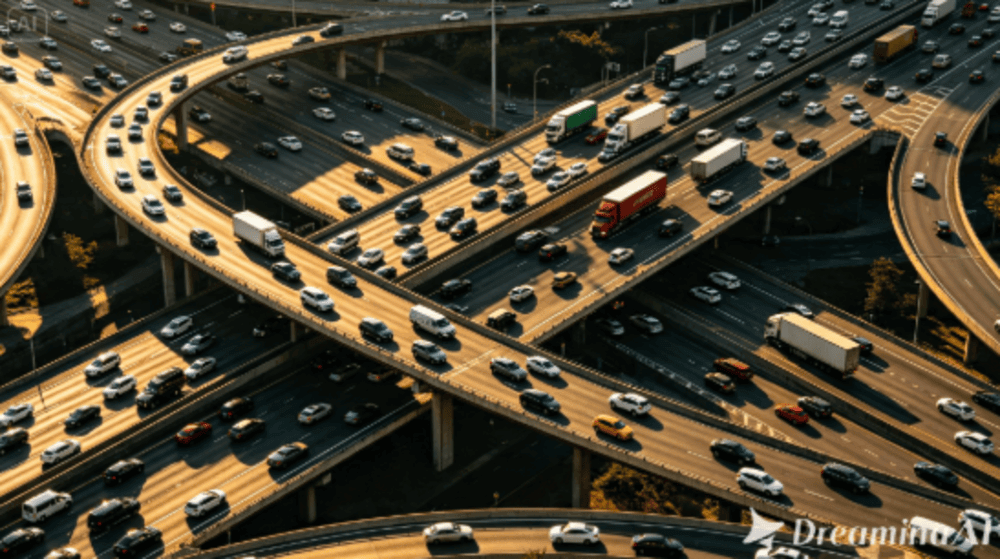
Exploring different cities and landmarks
Once the technique is dialed in, applying the same miniature treatment to different cities, landmarks, or even natural landscapes can turn a single successful format into an ongoing travel-focused content series that keeps a consistent visual identity across many different locations.
Why miniature-style content has such broad appeal
There's something universally charming about seeing the real world rendered at toy-like scale. It plays with perception in a way that feels almost nostalgic, evoking childhood memories of model train sets and dollhouses, which is likely part of why this style of content consistently performs well across a wide range of audiences.
Considering time of day for stronger lighting contrast
Scenes photographed during golden hour or with clearly defined shadows tend to enhance the miniature illusion further, since strong directional light is part of what makes real tilt-shift photography so effective, and that same visual logic carries over well into generated video.
What makes a miniature effect feel genuinely convincing
A few specific details separate a miniature effect that truly sells the illusion from one that just looks like a slightly blurred photo:
- A high, slightly angled vantage point that mimics how miniatures are typically photographed
- Selective focus that keeps a narrow band sharp while blurring the rest
- Movement that feels slightly sped up, mimicking how small objects appear to move faster
Shrinking the world down: Three steps with Dreamina
Step 1: Upload your image and describe the flowing motion
Sign in to Dreamina and open the "AI Video" section. Click "Add reference image" to upload your photo, then add your prompt to describe the video.
For a 30-second video, try: Using the city street from the reference image, generate a 30-second video: cars and pedestrians moving with a slightly sped-up, toy-like quality, a narrow band of the street staying in sharp focus while the surrounding buildings blur softly, camera slowly panning across the scene to emphasize the miniature effect throughout.
Step 2: Make a loop using Seedance 2.5
Once you've uploaded the image and prompt, select the Seedance 2.5 model in the generation option. Afterwards, select the length of the video and the ratio. Choose 16:9 if you are posting on YouTube, or 9:16 for TikTok. After this, you need to click on the Dreamina icon and wait for a few seconds till the process is completed.
Step 3: Edit and export your seamless video
Before saving the video, you can edit it with Dreamina’s AI editing tools. For instance, you may utilize AI features such as Upscale for increasing the image size or Generate soundtrack for audio addition. Finally, you can save the video and share it on different social networks.
Choosing source photos with strong miniature potential
Not every photo translates well into this style. Aerial or elevated shots of busy scenes, like city streets, traffic intersections, or crowded plazas, tend to sell the illusion far more convincingly than close-up or ground-level photography, where the scale trick doesn't read as clearly.
Seedance 2.5: Precision for a believable scale illusion
Reduced "AI look" for realistic movement at altered scale
The miniature effect depends on motion feeling slightly unnatural in a very specific way, and Seedance 2.5's improvements in physically believable movement help that sped-up, toy-like quality feel intentional rather than glitchy.
Reading complex spatial layouts
The model can interpret richer references, including white model data, which helps it understand depth and distance in a busy scene, useful for maintaining a convincing sense of scale across an entire cityscape.
Longer clips for a fuller miniature scene
Native generation supports clips up to 30 seconds, with the "Ultra-long Video Generation (beta)" mode extending that range up to 180 seconds, giving a miniature scene enough time to be explored across multiple areas of the frame.
Precise local editing
Local editing allows specific elements, like a stray object breaking the illusion, to be removed without regenerating the entire scene.
Selecting scenes with enough visible activity
The miniature effect works best in scenes with plenty of small, moving elements, like cars, pedestrians, or boats, since watching many small things move at once is a large part of what makes the illusion feel alive rather than static.
Pairing the effect with playful, toy-like sound
Adding a light, playful soundtrack, sometimes even mimicking the sound of a wind-up toy or music box, can reinforce the miniature illusion in a way that complements the visual effect rather than competing with it.
Common mistakes when creating miniature world content
A handful of habits tend to weaken the effect:
- Choosing a source photo taken from too low or too close a vantage point
- Ignoring selective focus, which is often what sells the illusion most convincingly
- Overdoing the sped-up motion until it looks more like a technical glitch than a stylistic choice
Where these miniature world videos perform best
This format works especially well on TikTok, Instagram Reels, and YouTube Shorts, particularly on travel, urban photography, and creative content accounts, where the charm of seeing familiar places rendered at toy-like scale tends to draw significant curiosity and shares.
Final thought
The miniature illusion has always relied on tricking the eye into seeing the world at a smaller scale. With Dreamina and the scale-aware precision behind Seedance 2.5, that trick can now be applied directly to any photo, turning an ordinary aerial shot into the kind of charming, toy-like video that keeps people watching just to admire the illusion.